
A ticket for every gown
Each alteration is a record on the bride's order: the gown, the services, the price and who is working on it. Nothing lives on a paper tag that can fall off in the workroom.
Bridal alteration software
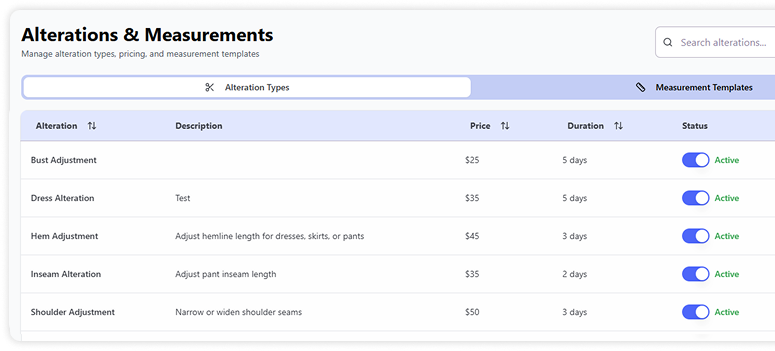
FittingFlow keeps each bride's alterations in one place: the services and price, her measurements, the due date, who is working on the gown and whether it is ready. No paper tags, no spreadsheet, no guessing the week before the wedding.
A bridal gown usually needs two or three fittings, several services and a hard deadline. The software has to follow the gown through all of it, and the whole team has to see the same thing.
Each alteration is a record on the bride's order: the gown, the services, the price and who is working on it. Nothing lives on a paper tag that can fall off in the workroom.
Set up your services once, such as hem, bustle, bust or shoulder adjustments, each with a price and a usual number of days. Staff pick from the list, so quotes stay consistent.
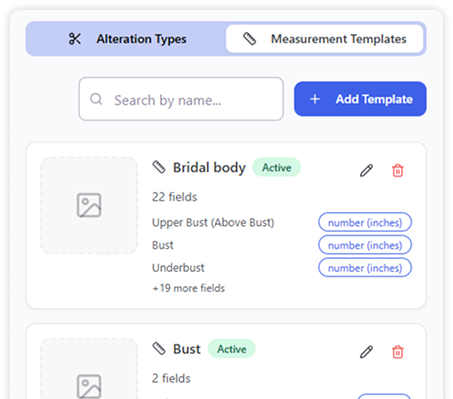
Save measurements with templates, for example a full bridal body template with upper bust, bust, underbust and the rest. The next fitting starts from the same numbers.
Orders carry a due date, so the team can see which gowns are coming due before a busy wedding weekend and plan the workroom around them.
Move work across the alterations board from pending to in progress to completed, with urgency flags and staff assignment. The front desk and the seamstress see the same status.
At pickup the bride reviews the work, accepts your pickup policy and signs on screen, and you can print a receipt. The record shows exactly what was handed over and when.
The bride comes in for her first fitting. Her appointment, contact details and wedding plans are already on her profile.
The seamstress records measurements on a bridal template, so the numbers are saved with the bride, not on a notepad.
Services come from your price list, the total is added to her order, and a due date is set well ahead of the wedding.
The job is assigned and started on the alterations board, so everyone can see who has the gown and how far along it is.
Each fitting opens the same record: past measurements, what was changed and what is still to do.
The bride signs for the gown, the balance is taken on the order, and the alteration is marked completed.
Most boutiques start with a notebook, a tag pinned to the garment bag or a shared spreadsheet. It works while the workroom is quiet. In peak season the same gown is touched by a consultant, a seamstress and the front desk, and each of them keeps a slightly different version of the truth.
The costs show up at the worst moment: a bride calls to ask if her gown is ready and nobody knows, a price quoted at the fitting is not the price on the invoice, or measurements from the first fitting cannot be found at the second. Bridal alteration software fixes this by keeping one record per gown that everyone reads and updates.
General tailoring software can track a job ticket, but it does not know about bridal appointments, orders and deposits. FittingFlow keeps alterations next to the rest of the boutique, so the fitting, the order, the alteration and the payment are one story. See how the rest of the shop runs in our bridal boutique software guide, or compare options in how to choose boutique software.
Bridal alteration software tracks each gown's alterations from the first fitting to pickup: the services and price, measurements, the due date, who is working on it, and its status. FittingFlow does this inside the same system a boutique uses for appointments, orders and payments.
Yes. You create your own list of alteration types, each with a price and a usual number of days. Staff choose from that list when they write up a ticket, so every bride gets the same price for the same work.
Yes. Measurement templates hold the fields your shop uses, such as a full bridal body template, and the measurements are saved on the bride's record for every later fitting.
Every order has a due date, and the alterations board shows each job's status, urgency and the staff member assigned. That makes it easy to see what has to be finished before a busy weekend.
It is built for bridal boutiques with an in-house seamstress or workroom, and it also works for alteration studios that handle bridal gowns. Shops focused on everyday tailoring can see our alteration software page.
Alteration management, measurement templates, alteration reminders and the customer portal are included in the Professional and Business plans. Every plan starts with a 30-day free trial; see the pricing page for current prices.
Start saving time, reducing errors, and delivering unforgettable client experiences.